Layered Architecture for Scalable AI Workflow Automation
Tags: AI Workflow Architecture, Orchestration Layer Design, Containerization, Scalable AI Systems
Modern AI workflows are no longer simple pipelines that move data from A to B: they’re dynamic, multi-layered systems orchestrating LLMs, APIs, databases, and analytics engines.
Without proper architecture, such systems quickly become fragile and expensive to scale. That’s why leading organizations are adopting layered architectures that helps in separating responsibilities across data, processing, orchestration, and user interaction layers.
This article breaks down how to design and implement a scalable AI workflow architecture, complete with containerization, orchestration, and monitoring strategies.
1. What Is a Layered AI Workflow Architecture?
A layered architecture separates an AI automation system into distinct functional layers - each with a clear purpose and interface.
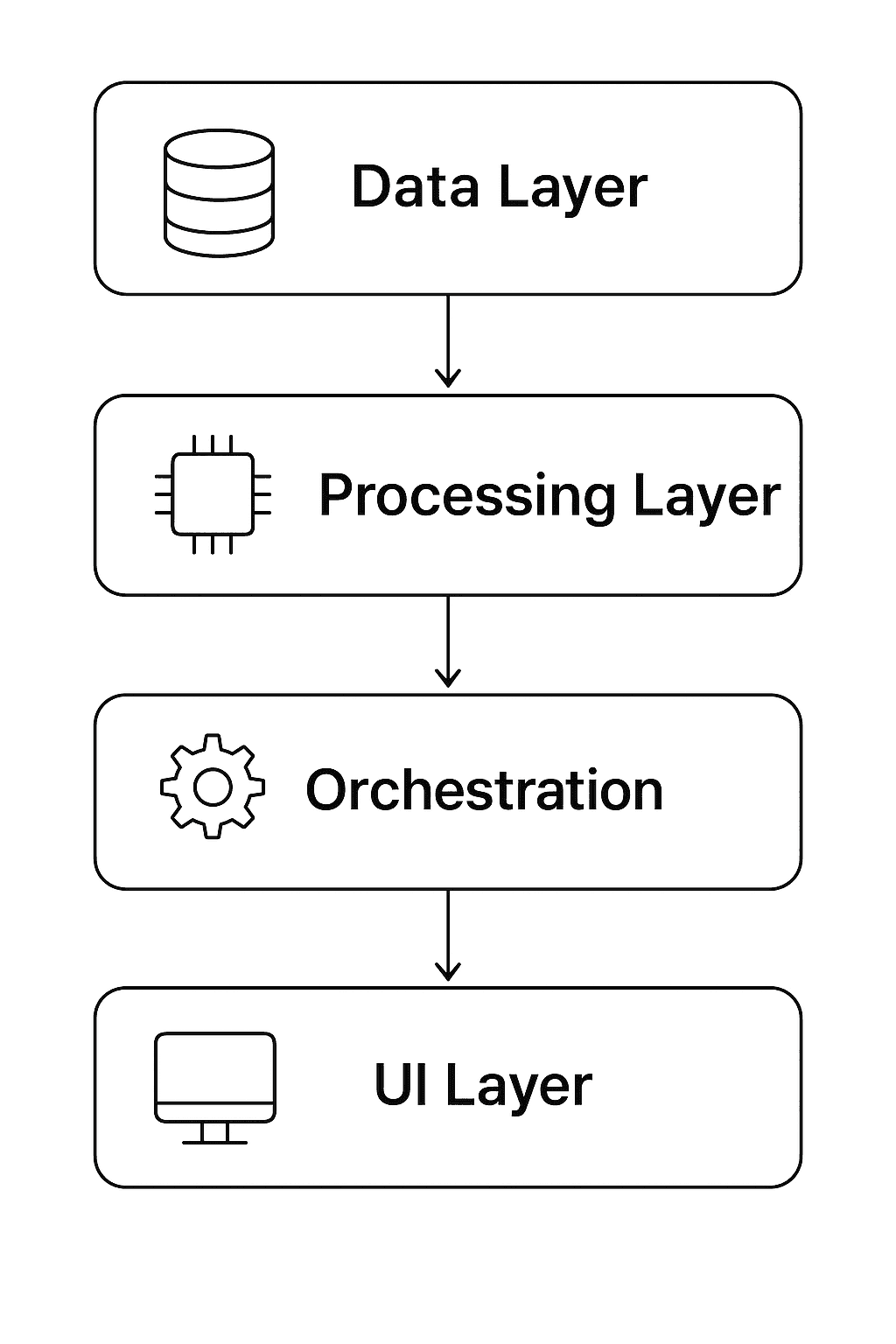
Typical 4-layer structure:
Data Layer - ingestion, storage, and preprocessing
Processing Layer - AI/ML models and workflow logic
Orchestration Layer - scheduling, coordination, fault tolerance
Presentation Layer (UI/API) - visualization and user interaction
This modularity provides:
Scalability: Each layer scales independently
Maintainability: Easier debugging and versioning
Security: Layer-specific access control
Extensibility: Swap components (e.g., change model provider) without rewriting the whole stack
2. Overview Diagram
(Diagram will be included after the text)
3. The Data Layer
The Data Layer is the foundation. It ingests, cleans, and stores data that powers all downstream automation.
Core Components
Data Sources: APIs, databases, sensors, CRM/ERP systems
ETL Pipelines: Extract-Transform-Load processes (e.g., Airbyte, Fivetran, Apache NiFi)
Storage: Data lakes (S3, GCS), data warehouses (Snowflake, BigQuery), or real-time stores (Redis, Kafka)
Best Practices
Schema Standardization: Ensure consistent metadata across sources.
Data Validation: Validate incoming data with frameworks like Great Expectations.
Versioned Storage: Use object versioning (e.g., Delta Lake) to maintain reproducibility.
Example
This DAG (Airflow) ensures daily ingestion into the Data Layer.
4. The Processing Layer
The Processing Layer performs reasoning, prediction, or decision logic using AI/ML models or automation rules.
Functions
Model inference (LLMs, ML models, or statistical engines)
NLP, data transformation, and summarization
Decision logic (rule engines, prompt templates, or agents)
Example Flow
Implementation Example
In a scalable setup, these inference jobs run as containerized microservices:
Key Considerations
Model abstraction: Keep interfaces generic (e.g.,
/predict) to swap models easily.Caching: Use Redis or Memcached to cache repeated queries.
GPU scheduling: Offload model inference to GPU pools managed by Kubernetes.
5. The Orchestration Layer
The Orchestration Layer coordinates multi-step workflows and ensures reliability.
Responsibilities
Triggering workflows based on events or schedules
Managing dependencies and error handling
Scaling worker nodes dynamically
Integrating human-in-the-loop steps when required
Tools & Frameworks
Workflow engines: Apache Airflow, Prefect, Temporal, n8n
Agent orchestrators: LangGraph, Semantic Kernel Planner
Queue systems: RabbitMQ, Celery, Kafka
Example: Agentic Orchestration
This example illustrates how a reasoning flow is orchestrated via nodes and edges — each node representing a modular task.
6. The Presentation Layer
The Presentation Layer is where users interact- through dashboards, APIs, or chat interfaces.
Core Interfaces
Web UI: Streamlit, React, or v0.dev front-ends
APIs: REST/GraphQL endpoints for programmatic access
Dashboards: Power BI, Tableau, or custom dashboards for visualization
Best Practices
Expose read-only APIs for external clients to maintain system integrity
Add authentication & rate-limiting to avoid misuse
Implement real-time event tracking via WebSockets or Kafka Streams
Example (FastAPI Endpoint)
7. Containerization & Deployment
Containerization ensures consistent environments for each layer.
Dockerization
Each layer can be built as a separate Docker image:
Kubernetes Deployment
Use Kubernetes (K8s) for scaling services:
Deployments: run multiple replicas of LLM services
Horizontal Pod Autoscaler (HPA): scale workers based on CPU/memory load
ConfigMaps & Secrets: store credentials securely
Ingress: expose APIs via load balancers
8. Monitoring, Logging & Metrics
Visibility is essential for reliability.
Key Metrics
Layer | Metrics to Track |
|---|---|
Data Layer | ingestion latency, data validation errors |
Processing Layer | model latency, token usage, error rate |
Orchestration Layer | workflow success/failure ratio, queue backlog |
UI/API Layer | API response time, concurrent sessions |
Monitoring Stack
Prometheus + Grafana: metrics collection and dashboards
ELK Stack (Elasticsearch, Logstash, Kibana): log aggregation
Sentry / OpenTelemetry: error tracing across layers
Alerting Example
9. Security and Governance
A layered setup allows granular security enforcement:
Data Layer: encrypt data at rest (AES-256, KMS)
Processing Layer: secure model APIs with JWT/OAuth
Orchestration Layer: audit logs and access tokens
UI Layer: enforce role-based access control (RBAC)
Compliance
If dealing with sensitive data (health, finance), integrate:
GDPR/HIPAA compliance checks
Data anonymization pipelines
Access logging for auditability
10. Scaling Strategies
Horizontal Scaling
Run multiple pods for each service type
Use message queues to distribute workload
Vertical Scaling
Assign GPU nodes to model pods
Optimize inference batch size for throughput
Auto-Scaling Example (K8s)
11. Observability Example: End-to-End Monitoring Flow
Workflow Execution → Orchestrator logs to Kafka
Metrics Exporter → Pushes data to Prometheus
Dashboard → Grafana visualizes token cost, latency, success rate
Alerts → Slack/email notifications on anomalies
This ensures you detect drift or failures before they affect production.
12. Putting It All Together
End-to-End Data Flow
Example:
A customer sends a feedback form → Data layer stores input → Processing layer performs sentiment analysis → Orchestration layer triggers workflow → UI displays summarized report.
A well-designed layered architecture turns AI workflow automation from a brittle prototype into a scalable, observable, and secure system.
By decoupling data ingestion, processing, orchestration, and presentation, teams can evolve each component independently while maintaining global control through observability and containerized deployments.
As workloads grow, Kubernetes and monitoring stacks ensure your automation scales seamlessly — without losing visibility or reliability.