
Quick recommendation
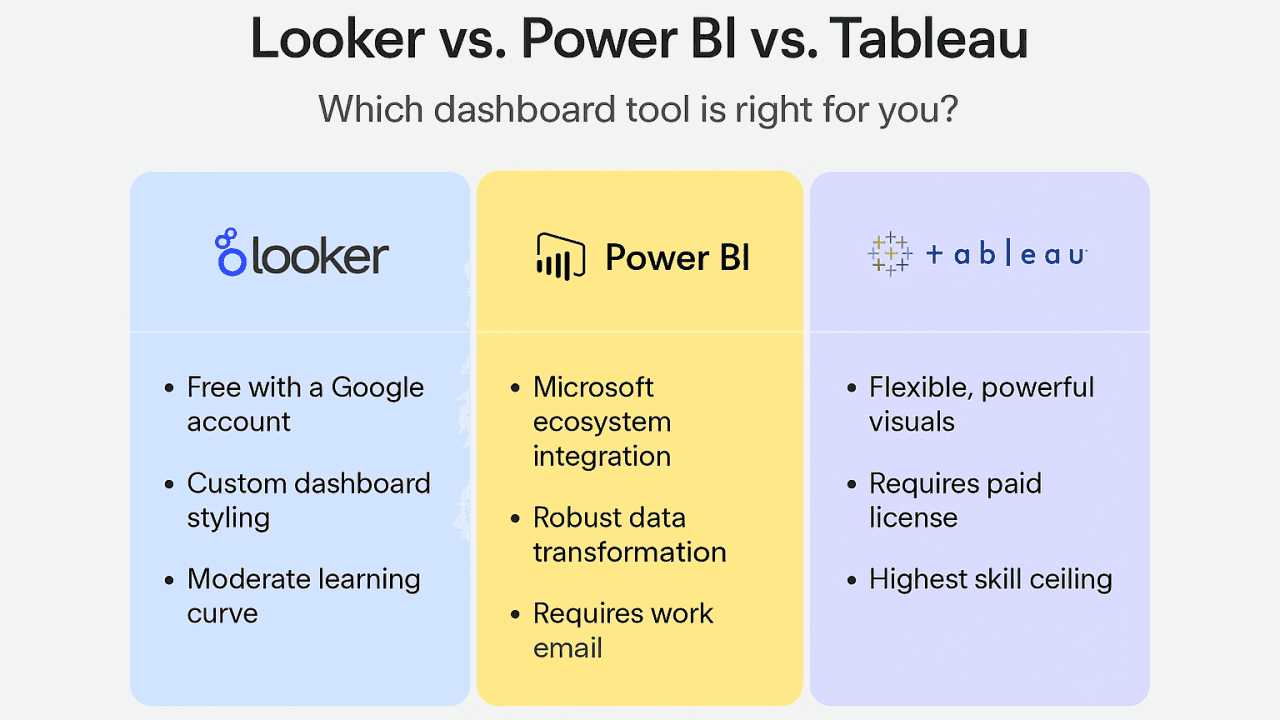
Pick Power BI if your organization is Microsoft-centric, wants the most cost-efficient entry point, and values fast time-to-insight with integrated Copilot-style assistants.
Pick Tableau if your team prioritizes best-in-class visual exploration and analyst-driven discovery with growing AI features.
Pick Looker (or Looker + Looker Studio) if you need a governed, data-model-first platform that scales with modern cloud data warehouses and embeds analytics into products
How the 2025 landscape changed (short)
AI-first experiences: Power BI added a standalone Copilot that lets users “Ask Anything” across reports and semantic models — accelerating natural-language-driven exploration.
Tableau continues AI investments, shipping new releases focused on generative and assistant features across the platform to streamline analysis workflows.
Looker/Looker Studio evolution: Google is tightening the ties between Looker (model-driven) and Looker Studio (visual/reporting) to give teams both governance and flexible visualization options.
These platform shifts make AI and governance top-line decision factors in 2025.
Side-by-side at-a-glance
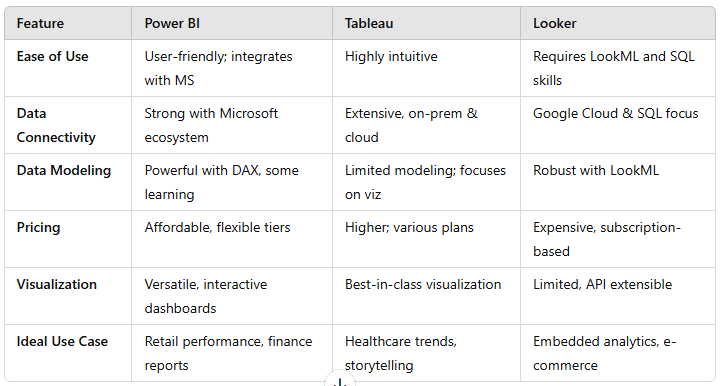
Category | Power BI | Tableau | Looker |
|---|---|---|---|
Best for | Microsoft ecosystem, value-focused orgs | Analytic exploration & visualization-driven teams | Data model/governance-first orgs & embedded analytics |
AI & assisted analysis | Strong Copilot integration, Fabric alignment. Easy natural language Q&A | Advanced in-product AI & “Pulse/Concierge” capabilities focused on analyst workflows. | Increasing AI capabilities; emphasis on semantic models and governed insights. |
Pricing model | Per-user (Pro/PPU) and capacity options — cost-efficient entry; recent price updates in 2025 increased Pro/PPU rates. | Role-based licensing (Creator/Explorer/Viewer) — typically higher per-user costs for Creators. | Enterprise pricing — platform + user pricing; often sold as a package with substantial minimums (contact sales) |
Deployment | Desktop + cloud + on-prem (Report Server) | Cloud (Tableau Cloud), on-prem options | Cloud-native, strong integration with modern warehouses |
Learning curve | Moderate (DAX learning for modeling) | Moderate to high (data prep + Viz best practice) | Higher (LookML modeling skills required) |
In-depth: strengths & trade-offs
Power BI — Pros & when to choose it
Pros
Deep Microsoft ecosystem integration (Excel, Azure, Microsoft 365).
Rapid feature cadence and growing AI (Copilot + Fabric
Cost-effective for small-to-medium teams (free Desktop; Pro/PPU tiers).
Trade-offs
DAX and advanced modeling have a learning curve.
Large-scale enterprise governance requires Premium/Fabric capacity planning.
Best for: Organizations already on Microsoft products, finance/marketing teams that want quick dashboards, or companies prioritizing value.
Tableau — Pros & when to choose it
Pros
Exceptional visual analytics and interactive exploration.
Continual AI enhancements to support analysts and end-users
Strong designer community and advanced visualization capabilities.
Trade-offs
Per-user pricing for Creators can be higher; may become costly at scale.
Embedding and governance typically require more setup than model-centric platforms.
Best for: Data visualisation-first teams, consultancies that need story-rich dashboards, organizations where analyst capability is the primary asset.
Looker — Pros & when to choose it
Pros
Semantic modeling (LookML) enforces a single source of truth and governance.
Native fit for cloud data warehouses and product-embedded analytics.
Able to serve both governed enterprise analytics and flexible reporting (with Looker Studio ties).
Trade-offs
Requires developer/engineering investment to model data correctly.
Pricing is enterprise-focused; purchases usually involve sales negotiation.
Best for: Organizations with centralized data teams, product teams needing embedded analytics, and those prioritizing governance.
Cost reality check (2025 updates)
Power BI: Microsoft adjusted pricing in 2025 — Power BI Pro rose to ~$14/user/month and Premium Per User to ~$24/user/month (effective April 1, 2025), changing TCO calculations for larger user counts.
Tableau: Maintains role-based pricing (Creator/Explorer/Viewer) which can be higher for Creator-heavy teams; budget accordingly.
Looker: Typically sold as an enterprise package with platform and user components — expect higher entry costs and negotiated contracts
Implementation & governance: what to plan for
Data modeling: Looker is model-first (LookML). Power BI and Tableau both support data models — Power BI’s DAX and semantic models are powerful but need governance.
Security & compliance: All three support enterprise security features; map requirements (RLS, encryption, audit) to the tool’s native capabilities.
Embedding & APIs: Looker and Tableau have mature embedding APIs; Power BI Embedded is strong for Microsoft-aligned product teams.
Skill mix: Power BI favours Excel-savvy analysts; Tableau favors visual analytics practice; Looker requires modeling and engineering skills.
Comparison scenarios — which tool to pick by use case
SMB marketing team needing campaign dashboards: Power BI (fast, low cost).
Consultancy creating interactive visual stories for clients: Tableau (best-in-class exploratory visuals).
SaaS company embedding analytics in product and enforcing one semantic model: Looker (model + embed focus)
Large enterprise with Microsoft stack and desire for AI copilots: Power BI (Copilot + Fabric integration).
Q&A — quick answers to some common questions
Q: Can I switch later if I pick the wrong tool?
A: Yes, but migrations are non-trivial. Consider dataset portability, API differences, and how much modeling/visual work needs to be converted. Budget for migration costs.
Q: Which tool is best for self-service users?
A: Power BI and Tableau are strong for self-service analysts; Looker is more governed and developer-driven.
Q: Are these tools replacing data engineering?
A: No — they complement it. Modern BI relies on clean, modeled data in warehouses; engineering+analyst collaboration is still essential.
Practical checklist for evaluating vendors
Which data sources & warehouses are natively supported?
Does the platform support semantic models (and how are they built)?
What AI/assistant capabilities exist and how are they governed?
Licensing model (per-user, capacity, or platform + users)? Get real quotes for your user mix.
Embedding & API limits, SLAs, and support model.
Compliance (data residency, certifications, audit logs).
There’s no one-size-fits-all winner in Power BI vs Tableau vs Looker. The best choice in 2025 depends on your existing tech stack, team skills, governance needs, and budget. If AI-driven discovery and Microsoft alignment matter most, Power BI is a compelling fit. If exploratory analytics and visualization craftsmanship are your priorities, Tableau is hard to beat. If you need strict semantic governance and embedded analytics at scale, Looker is frequently the right platform.